Practical iPhone guides
How to track days spent in each country on iPhone
Review country totals and the dates behind them, add missing stays, and keep a personal record without an Whereday account.
Count the dates you can account for
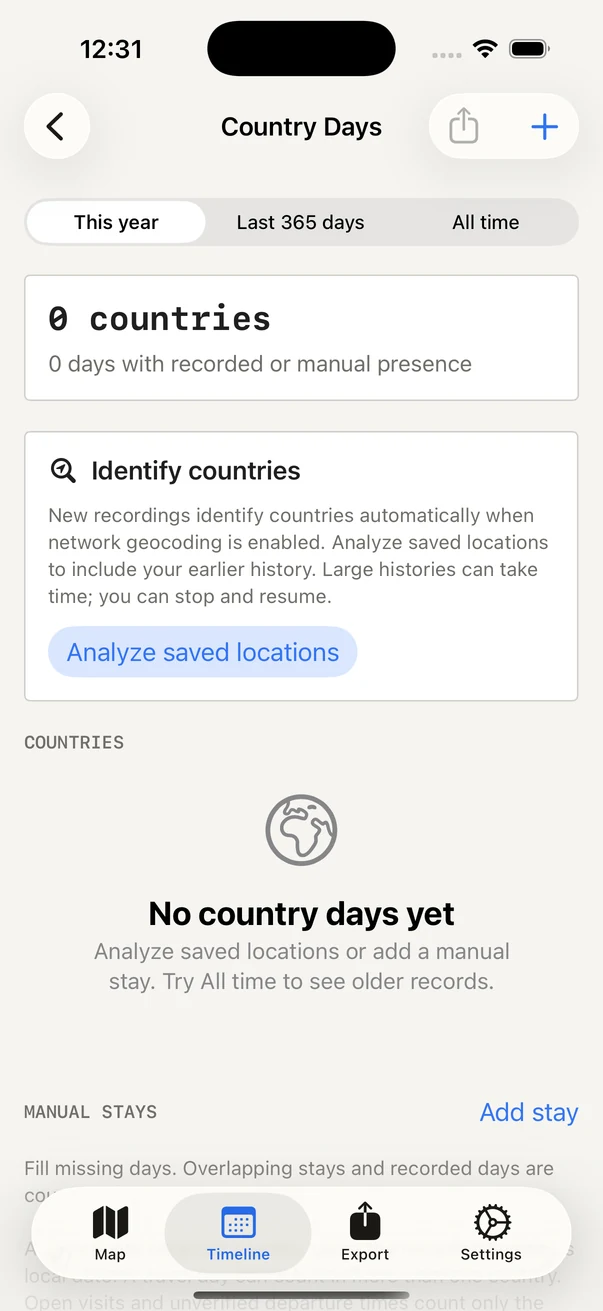
In Whereday, open Timeline → Country Days to count local dates represented by your recorded visits, route points, and manual stays. Choose this year, the last 365 days, or all time, then open a country to review its dates. Viewing the counts and adding manual stays are free. Writing the CSV file requires the optional export purchase.
This guide covers Country Days in Whereday 1.7.16. It is a personal travel journal: its rules do not determine tax residency, immigration status, or how a visa counts a day.
1. Review the dates behind each total
- Open Timeline, then Country Days.
- Select a period. The default is this year; the other choices are the last 365 days and all time.
- Open a country and review the individual dates. A total is only useful when you understand which dates produced it.
- If older locations lack countries, use the analysis controls described below. If nothing was recorded for a stay, add it manually rather than expecting GPS to recreate it.
To collect new history, start recording before your trip. Start enables detailed GPS and visit monitoring together; Stop ends both. Read the first-recording guide for permissions and recording controls.
2. Check the counting rules
| Situation | How Whereday counts it |
|---|---|
| Many points in the same country on one date | One day for that country, rather than one day per record. |
| Two countries on a travel day | That date can count in both countries. Adding country totals may exceed the number of distinct dates. |
| A record near midnight | The resolved location’s timezone determines the local date, rather than UTC or your phone’s current timezone. |
| A completed visit with a verified departure | Its local date range can contribute multiple dates. |
| An open visit or unverified departure | Only its arrival date is counted. Route points or manual stays can account for other dates. |
| Unknown country, GPS outlier, or recording gap | No invented dates or automatic continuous stay. |
| Overlapping manual and recorded presence | The date counts once per country; the source flags can show both. |
A checked example: four country dates across three dates
We passed invented records through the country-day calculator included in Whereday 1.7.16 (46), then saved and read back its CSV output. Country labels and timezones were assigned directly for this test; no coordinates were sent for geocoding and no real trip was recorded.
- Portugal: two points on October 1, plus an overlapping manual stay from October 1 through October 2.
- Spain: a point later on October 1, using Europe/Madrid.
- France: a point at 22:30 UTC on October 2, using Europe/Paris. Its local date is October 3.
- Excluded: an October 4 point flagged as an outlier, and an October 5 point without a country or timezone.
| Country | Local date | Source |
|---|---|---|
| Spain (ES) | 2026-10-01 | recorded |
| France (FR) | 2026-10-03 | recorded |
| Portugal (PT) | 2026-10-01 | recorded+manual |
| Portugal (PT) | 2026-10-02 | manual |
Portugal has two days, Spain one, and France one. The sum is four country dates, but only three distinct local date labels appear. Portugal and Spain both include October 1. The repeated Portugal point and overlapping manual stay do not create extra Portugal rows, and the excluded records do not fill October 4 or 5.
Download the checked synthetic Country Days CSV and open it in a text viewer or spreadsheet. It has the exact four rows above and contains no personal history. The recorded source flag describes the input type; in this example those inputs are invented points.
Checked October 26, 2026 in an isolated Debug simulator rebuild of release source 1.7.16 (46), iOS 26.5. All 23 selected Country Days tests passed. This verifies the calculator, CSV writer, and file bytes for these inputs, not physical travel, country lookup accuracy, the export purchase, or the sharing interface.
3. Add a stay that was not recorded
Use Add stay in Country Days. Choose the country and first and last dates, add an optional note, and save. Review the affected country’s dates afterwards. You can edit or delete a manual stay when you find a mistake.
A manual stay records your account of a trip; it does not create a GPS path. Keep tickets or other original records separately if you need them. Overlapping manual stays do not multiply the same country/date.
4. Identify countries in older locations
New recordings identify countries when network geocoding is enabled. Analyze saved locations checks earlier records in batches, with stop and resume controls. It can take time for a large archive.
Country identification uses Apple geocoding and follows your network-geocoding preference. A lookup sends coordinates to Apple; turning it off changes which unresolved locations can be assigned a country. Your journal remains on your device, and Whereday does not receive an archive of it. See the privacy policy for all network boundaries.
Analysis can identify a country for an existing coordinate. It cannot recover locations that were never recorded. Use a manual stay for dates you can account for independently.
5. Keep a CSV copy of your country dates
Use the export control in Country Days and save the CSV to a destination you choose. The file includes country codes, local dates, and recorded/manual source information. Viewing and editing your counts are free; writing this export requires the lifetime unlock. See current pricing.
The CSV uses country_code, local_date, and source. Source is recorded, manual, or recorded+manual; the last value still represents one country/date. Compare your file with the checked four-row example and inspect a known date and a travel day. A country-date CSV is a summary, not a backup of every visit, route point, or manual stay. Keep your underlying records using the backup checklist.
Remember the country.
Keep the dates behind the count.
Start a free local journal and review Country Days on your iPhone.
Download free for iPhoneReviewed October 26, 2026 against the source used for App Store 1.7.16 build 46, including CountryDaysView, CountryDayCalculator, and CountryDayResolver. The checked CSV is generated from invented inputs using the released calculator. It does not represent a physical travel test or verification of the geocoding service.