Practical iPhone guides
Send Whereday location points to Dawarich
Pair the Overland payload with Dawarich’s batch endpoint, then verify the points at the destination. Webhooks are optional, off by default, and require Whereday’s export unlock.
Use Overland with the batch endpoint
For a Dawarich receiver, configure Whereday’s webhook format as Overland and use https://your-dawarich-host/api/v1/overland/batches. Authenticate with your instance’s API key. Check actual saved points after a small test; an HTTP success response alone does not establish that locations were stored.
This workflow is for keeping an iPhone journal in Whereday while optionally sending GPS points to a receiver you control. Dawarich also has its own tracking app; see its official tracker instructions if you want that workflow.
A checked three-point batch
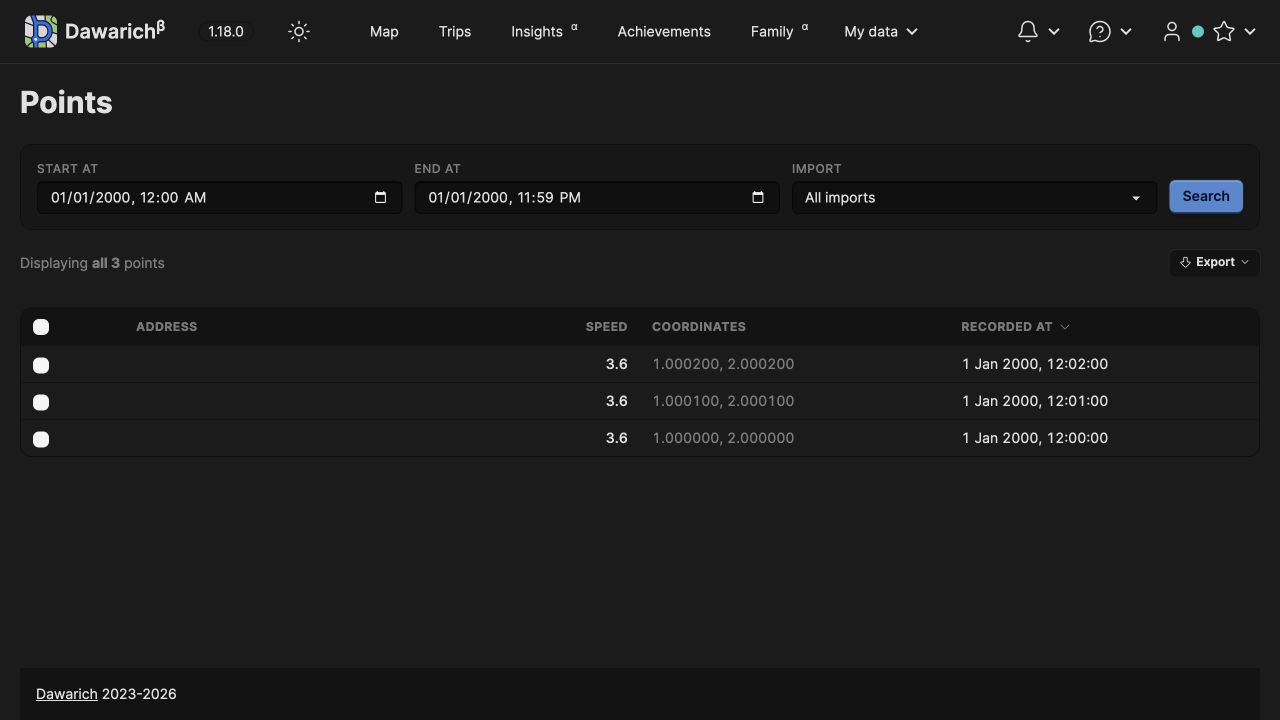
On October 26, 2026, Whereday’s unchanged native webhook code from release source 1.7.16 (46) sent three invented points to an isolated Dawarich 1.18.0 receiver. All three were stored with the expected timestamps, coordinates, altitude, speed, accuracy, and tracker ID. The values remained unchanged after restarting both the receiver and its database.
| Time | Latitude | Longitude | Stored result |
|---|---|---|---|
| 12:00:00 | 1.000000 | 2.000000 | Present after restart |
| 12:01:00 | 1.000100 | 2.000100 | Present after restart |
| 12:02:00 | 1.000200 | 2.000200 | Present after restart |
Download the exact synthetic Overland payload. It was generated by the released serializer and contains no personal history or credentials. It is a request-body example, not an Whereday restore file. Posting it to a receiver can create records there.
The check used a Debug simulator rebuild of the release source and a native test calling the real batch-flush path. The receiver was local, reached through a loopback tunnel, and isolated from outbound internet access. This verifies native serialization, authentication, transmission, and receiver persistence. It does not verify a physical recording, the complete settings workflow, production HTTPS, or unattended iOS background delivery.
Configure a small test before sending history
- Prepare your own Dawarich instance and obtain its API key from the account’s API access settings. Use an HTTPS address reachable from the iPhone.
- In Whereday, open the Export tab and its Webhook settings. Webhooks require the optional export unlock. Review the warning that records will leave the device before enabling delivery.
- Set the endpoint to your instance’s
/api/v1/overland/batchespath and select Overland as the format. Do not pair this payload with the OwnTracks endpoint. - Choose API Key (Query) authentication, set the key name to
api_key, and enter your instance’s key as the value. Keep the key out of screenshots and shared URLs. - For an initial recording test, choose By Count batching. Review the queue count and use Flush queue if points are waiting. Check the result in Dawarich before relying on ongoing delivery.
These settings follow the released app’s controls; the native test above exercised batch delivery directly. Use a dedicated test journal or destination when experimenting. Send now is different from flushing the queue: it reads all saved points, rather than just a short selected date range.
Whereday stores webhook credentials in the iOS Keychain. Once requests reach a receiver, its access controls and logs apply. Query parameters can appear in server or proxy logs; configure that destination accordingly.
Check stored points, not just “Connected”
The native Test Connection check returned HTTP 201 in this receiver test. Its synthetic point at 0,0 was not among the stored records. Dawarich 1.18.0 filters points within five kilometres of 0,0, so a successful connection can leave no visible test point. Other receivers can behave differently.
- Open Dawarich’s Points view and select the date and time range you actually sent. Its default recent-date filter would hide the January 1, 2000 sample.
- Compare the number of points, coordinates, and timestamps. For the sample, expect three rows from 12:00 through 12:02 UTC; check your display timezone.
- Review optional fields and units separately. A matching point count does not establish that every field or inferred visit transferred.
- Reopen the destination later and confirm the records remain. Keep the original journal and any backup until you have checked the receiver copy.
An invalid key returned HTTP 401 in the native test. Fix the endpoint and credentials before retrying. Whereday’s OwnTracks export is an array of messages; it is a different shape from Dawarich’s individual OwnTracks point receiver. The Overland result above does not establish OwnTracks compatibility.
Plan for delivery gaps
Overland carries GPS points, not a complete copy of Whereday’s visits, names, notes, settings, or outing edits. The webhook queue is held in memory; queued points can be lost when iOS terminates the app. Do not treat it as a durable offline archive or assume every historical point will be resent automatically.
The native regression suite covers successful queue clearing, failed-send retention, transient retries, and authentication errors using controlled responses. That is separate from the live receiver persistence check and does not establish long-term background reliability. See the send modes and retry reference and keep a separate backup.
Keep the local journal.
Choose its destination.
Recording and review are free. Webhook delivery requires the optional unlock; see current pricing.